Expert Catalog & Subscriptions
Add ready-made experts from the curated catalog to your workspace with a single click.
The Expert Catalog is a curated collection of ready-made experts that you can add to your workspace with a single click — no setup, no document uploads, no configuration. It's the fastest way to put a working expert in front of your team, especially when you need broad domain coverage (e.g. tax law, IT security, regulatory standards) that would take weeks to build from scratch.
Browse the Catalog
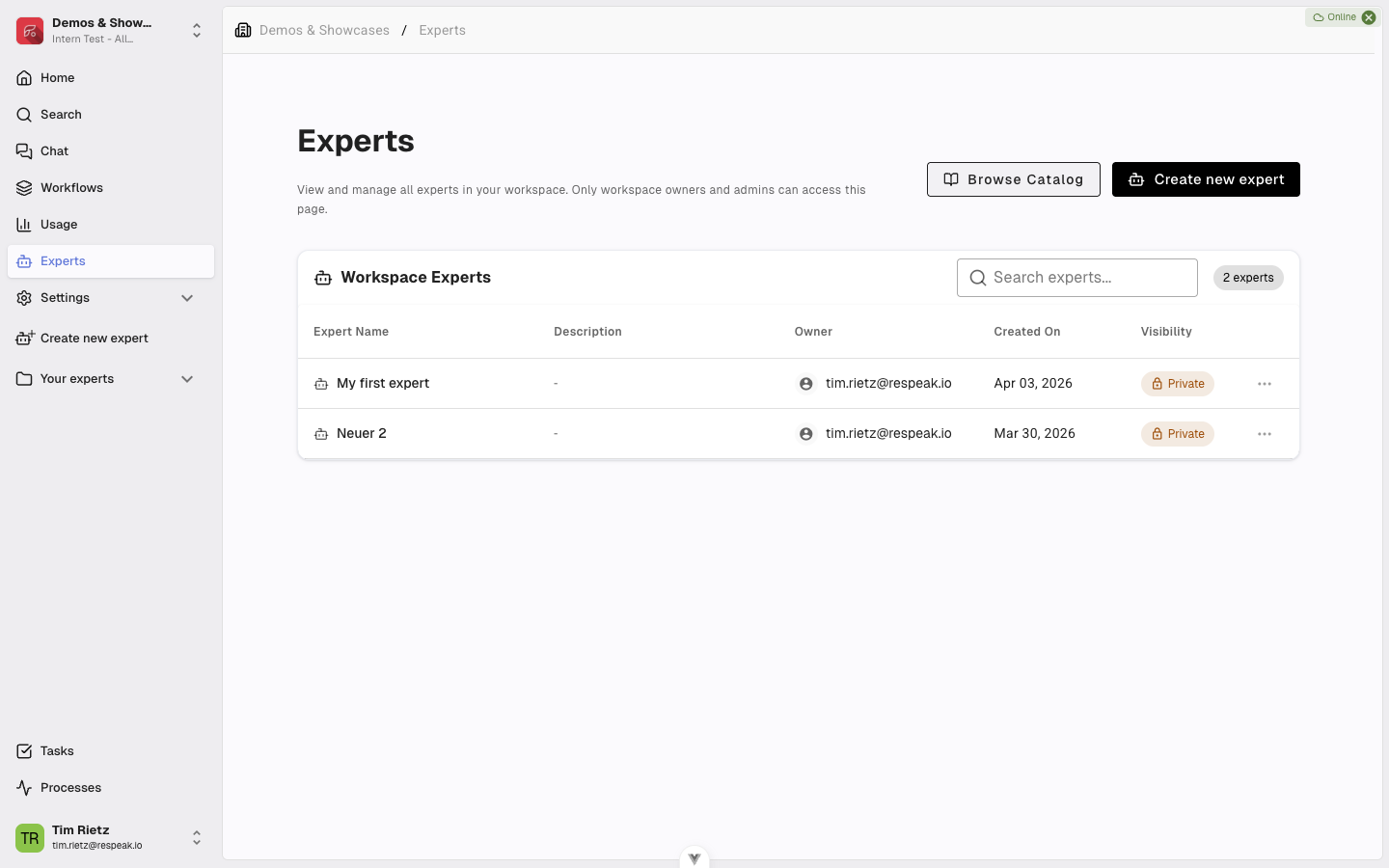
Open the Experts page from the main menu. In the top-right corner, next to Create Expert, you'll find a Browse Catalog button.
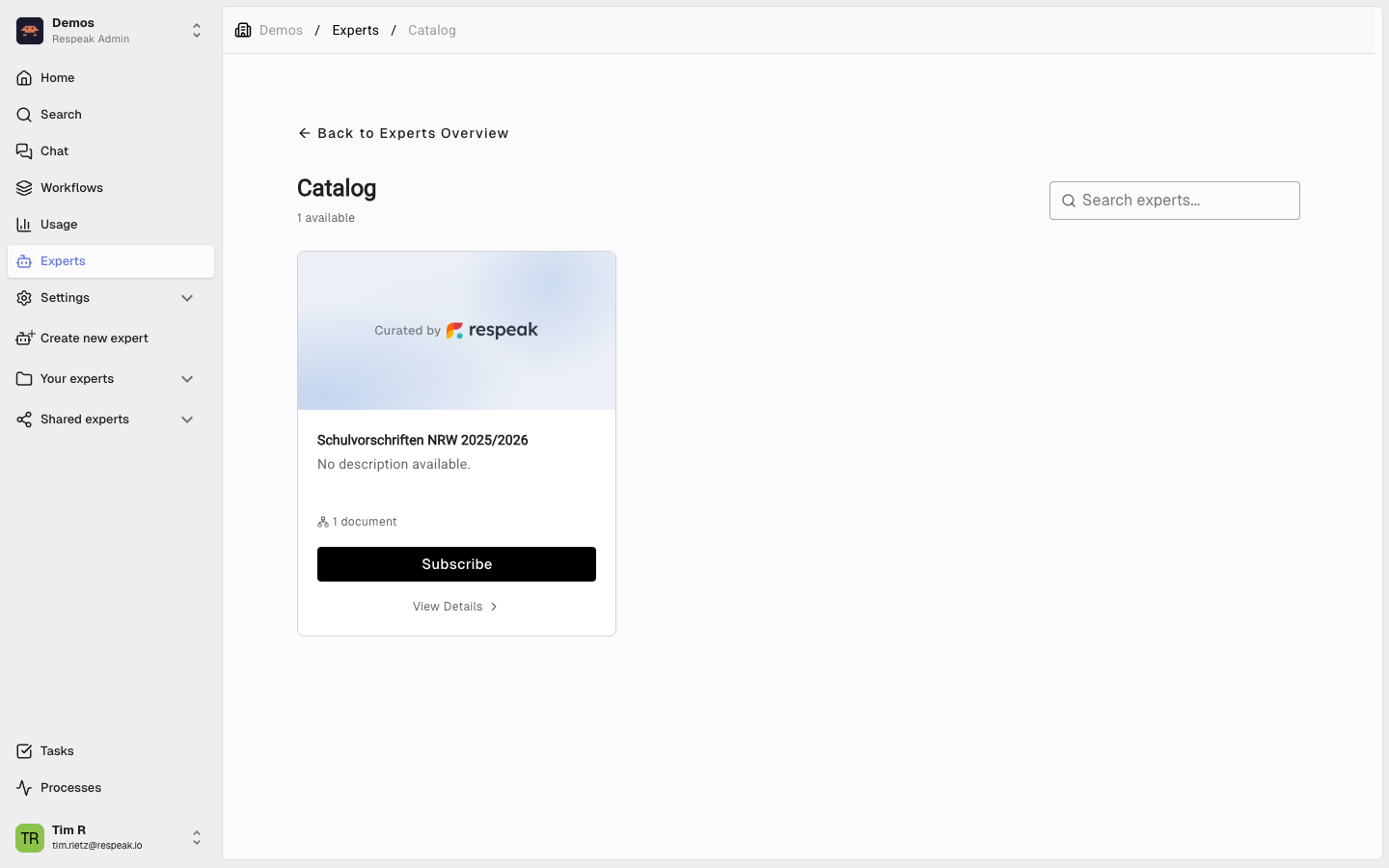
Clicking it opens the catalog. Each card shows the expert's name, a short description, the Curated by Respeak badge, and a count of the knowledge sources it draws on — so you can see what kind of content the expert is grounded in before you decide. Use the search box at the top of the catalog to filter by name or description.
See What's Inside
Click any card to open the Expert Detail view. The detail page lists everything the expert is built on:
Description — what the expert is for and how it's typically used.
Example questions — sample prompts you can try once you've subscribed.
Websites — the domains the expert has crawled and indexed, with the page count per domain.
Documents — the document filenames and types (PDF, DOCX, etc.) that make up the knowledge base.
This gives you full transparency about the source material before you bring the expert into your workspace.
Subscribe to an Expert
If the expert fits your use case, click Subscribe. The subscription happens immediately:
The expert appears in your workspace's regular Experts list, marked with a Curated badge so it's easy to spot.
It's available everywhere experts can be used — search, chat, and widgets.
It always reflects the latest version. When the catalog owner updates the expert, your subscription picks up the change automatically.
Only workspace admins (and owners) can subscribe or unsubscribe experts. Members and viewers can use a subscribed expert just like any other one, but they can't add new ones from the catalog.
What You Can — and Can't — Do with a Subscribed Expert
Subscribed experts are read-only inside your workspace. The content is maintained by the catalog owners, so:
You can | You can't |
|---|---|
Use the expert in chat, search, and widgets | Edit its name or description |
See its sources and example questions | Add or remove sources |
Embed it in widgets and share it via public link | Modify its prompt or settings |
Unsubscribe at any time | Change the underlying knowledge base |
This trade-off is what keeps the catalog version always up to date — you get a maintained expert without owning the upkeep.
Unsubscribe
Open the catalog or the expert's detail view and click Unsubscribe. Confirm the prompt and the expert is removed from your workspace immediately. Your team will no longer be able to chat with it or search its knowledge.
Unsubscribing doesn't delete anything on the catalog side — you can re-subscribe at any time and the expert will reappear in your workspace exactly as before.