Question Insights & Sentiment
Per-question results, top topics, and sentiment analysis of free-text.
The Questions tab breaks your results down one block at a time. Each question gets its own card, and what you see depends on the question type.
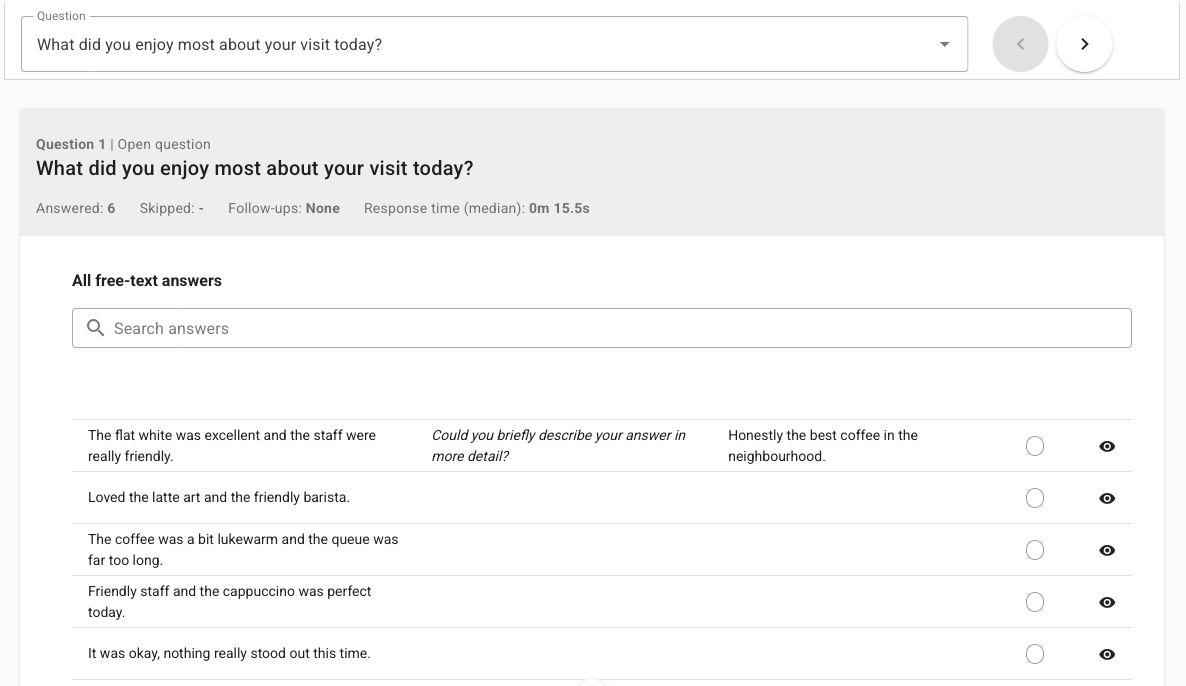
What every card shows
Whatever the type, the card header reports the same basics:
Answered — how many participants gave an answer.
Skipped — how many moved past without answering.
Follow-ups — how often the bot asked a follow-up here, shown as None, Few, Medium, or Many.
Response time (median) — the typical time participants took to respond.
Open Details for the full breakdown of a question.
Type-specific summaries
Question type | What the summary highlights |
|---|---|
Single choice / Multiple choice | Most frequent answer and how the options were chosen. |
Rating scale | Highest rating, Lowest rating, Average rating, and Standard deviation (how spread out the ratings are). |
Net Promoter Score (NPS) | The overall NPS score. |
Quiz | Whether it was solved, the Median number of hints used, and median response time for solved vs. unsolved attempts. |
Open question / ChatGPT | Free-text insights — see below. |
Insights from open questions
For Open question blocks (and other free-text answers), Respeak adds an extra layer of analysis:
Top topics — the themes mentioned most often across all answers.
Number of distinct topics — how varied the responses are.
Sentiment analysis — the overall mood, from Negative through Neutral to Positive, plus a chart of the Emotions in answers.
The free-text answers table
Below the insights, All free-text answers lists every individual response. Use Search to find a word or phrase, and read the Emotion column to see the mood detected for each answer. Follow-up answers appear in their own column.
Top topics and Sentiment analysis only appear when the AI analysis of free-text is enabled in your dialog's settings. If you see a prompt to collect more data, give the dialog a little more time and a few more responses.