Dialog Settings
Name, form of address, language, AI analysis of free-text, privacy, and advanced bot settings.
The Settings tab holds the foundations of your dialog — its name, how the bot addresses people, the language, privacy, and a few advanced touches. Open it from the left navigation in the Edit module.
Basic settings
Setting | What it does |
|---|---|
Dialog name | The name of your dialog. It is for your reference and appears across the platform. |
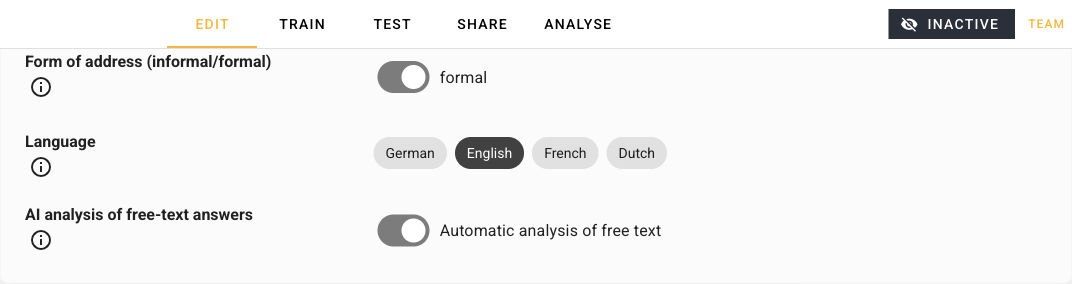
Form of address (informal/formal) | Defines how automatically generated messages address your participants — formal or informal. |
Language | Sets the dialog's language (German, English, French, or Dutch). This affects system-generated messages and the information shown in the interface. |
The Form of address and Language settings only shape automatically generated and system messages. The wording you type yourself into a question block is always used exactly as written.
AI analysis of free-text answers
Turn on AI analysis of free-text answers if you would like Respeak to analyse your participants' free-text answers for sentiment and key topics. The results appear later in the Analyse module.
Privacy
This section controls what your participants see about data protection.
Privacy information — the text shown to participants on request. Paste your own privacy text here, or provide a few details and let Respeak generate one for you.
Show privacy modal — when enabled (Modal enabled), a privacy modal greets new participants at the start of the dialog. Switch it off (Modal disabled) if no modal should appear.
Advanced settings
Bot reactions and bot character
These options are optional and live under Advanced settings.
Bot reaction to unheard voice messages — define one or more reactions for when a participant answers before listening to at least 90% of a voice message the bot sent. If you define none, the bot falls back to one of several default reactions.
Bot reaction to unwatched videos — the same idea for videos a participant answers before watching at least 90% of.
Bot character — briefly describe who the bot is and what personality or traits it should have. This is used only to help the AI generate training data for your character.
Set the Form of address, Language, and Bot character early — they influence the tone of messages the bot generates, so getting them right up front saves rework later.